

What Is listo? Photo-Verified Turnover Inspections for Short-Term Rentals
Getting consistent turnover photos out of cleaners is one of the hardest parts of running rentals remotely. listo is a newer app built to fix exactly that, and the structured photo record it produces happens to be the perfect input for AI damage detection.
listo is a photo-verified turnover inspection app for short-term rental hosts and property managers. It gives cleaning teams room-by-room checklists with reference photos that show how each space should look before the next guest arrives, then captures a timestamped verification photo for every item, marked OK or Not OK. The result is a structured record tied to a property, room, item, timestamp, and status, instead of a pile of random photos in a text thread.
That structure is also why listo pairs naturally with AI damage detection. listo handles capture; a tool like RapidEye handles analysis, comparing those photos against a per-property baseline to flag damage, missing items, and cleanliness failures. Capture first, intelligence on top.
If you have ever tried to manage a short-term rental remotely, you know the photo problem. Cleaners walk the property and snap whatever they happen to think of that day, and they miss a lot. The photos end up scattered across text messages, WhatsApp groups, shared albums, and individual phones. According to listo, that is how most operators still document turnovers, and it makes three things hard at once: reviewing the right photos quickly, proving when damage actually happened, and knowing whether a property was genuinely guest-ready before check-in.
listo organizes that process so every inspection photo is tied to a property, a room, a checklist item, a timestamp, and a status. The headline framing on its own site, "Set 5-star standards. Get 5-star reviews," and "Your properties. Your rules. Your proof," points at the same idea: turn each changeover into a documented, verifiable record rather than a judgment call.
What the OK / Not OK Flow Actually Looks Like
The core mechanic is simple. Each checklist item shows a reference photo of how that space or object is supposed to look. The cleaner frames their verification shot against it, then marks the item OK or Not OK and can leave a note. Here is a real checklist detail view from the app:
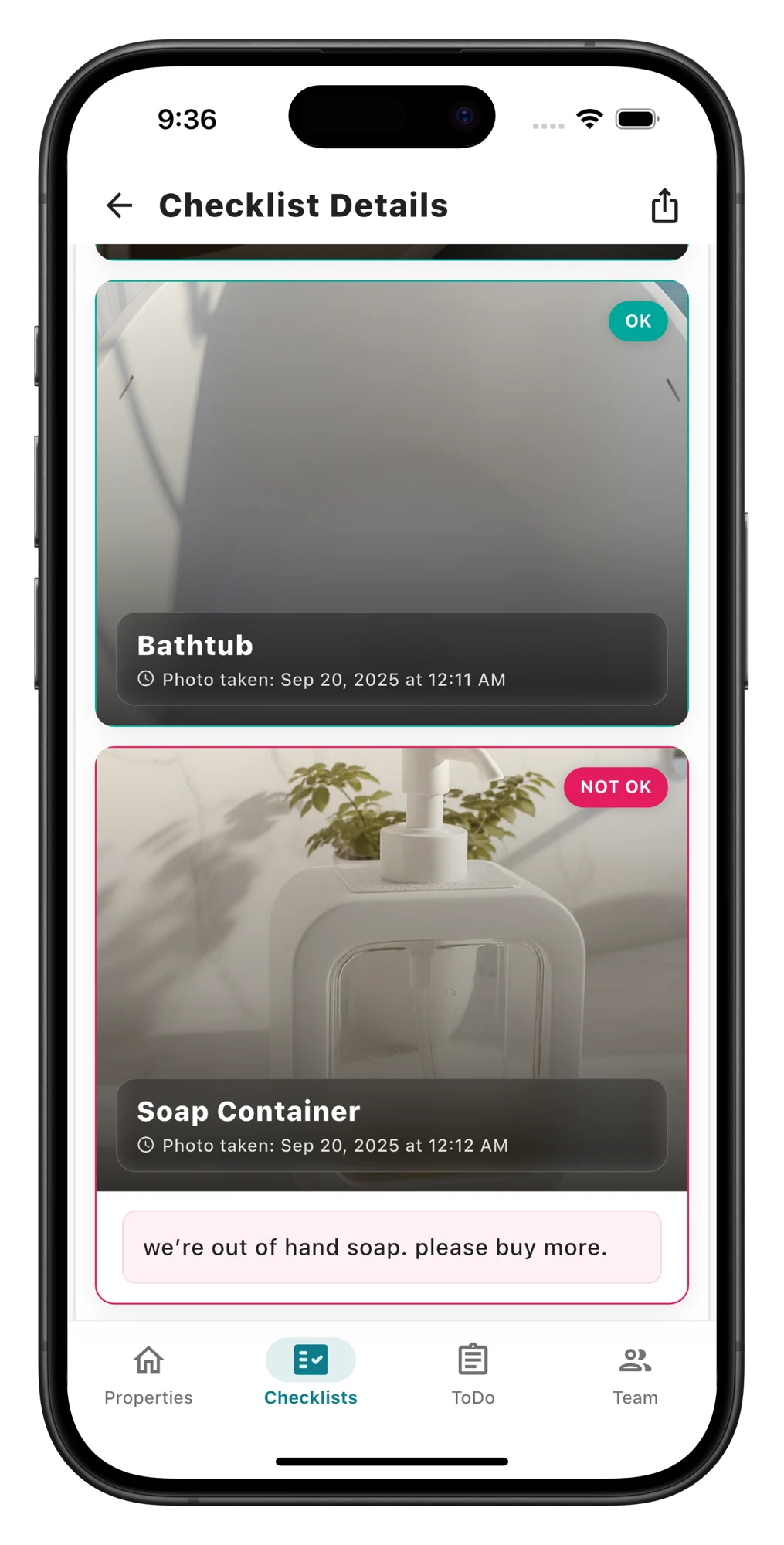
Bathtub. The verification photo matches the reference. The item passes, timestamped to the exact minute it was checked, so there is a record the bathtub was clean before arrival.
Soap Container. Flagged with a note straight from the cleaner: "we're out of hand soap. please buy more." The issue is logged against the item the moment it is found, not relayed three messages later in a group chat.
Source: listo app, Checklist Details screen. Each item carries a status, a photo, and a capture timestamp.
The value of this is not the checkbox. It is that the photo is captured against a reference. "Photo verification" stops meaning "snap something" and starts meaning "frame this shot like this one." A host can eyeball the difference in seconds, and every property ends up with a documented prep state for every single changeover.
Two Layers of Turnover Documentation
It helps to think about turnover documentation as two distinct jobs. One job is capturing the right photos consistently. The other is analyzing those photos for problems a person scrolling quickly will miss. They are different problems, and they are best solved by different tools.
listo prep verification, in the cleaner's hand
Reference-guided, room-by-room photo checklists. Every item gets a verification photo, an OK / Not OK status, an optional note, and a timestamp. The output is a consistent, organized photo record for each turnover.
RapidEye condition analysis, after capture
Compares the captured photos against a per-property baseline built from listing photos, Matterport scans, reference images, and prior inspections, then surfaces damage, missing items, and cleanliness failures with severity, so the operator reviews a short list instead of a full album.
The two layers are genuinely complementary rather than competitive. listo captures the data in a consistent operational workflow; RapidEye analyzes that data. A host ends up with a verified "this is how the property looked before the guest arrived" record, and an AI read on what changed and what needs attention.
Why Consistent Capture Makes AI Detection Work
This is the part operators tend to underrate. AI damage detection is only as good as the photos it receives. When a model has to compare a wide, evenly-lit shot of a living room from one turnover against a dark close-up of a couch cushion from the next, the comparison gets noisy and false positives climb. When the same item is photographed the same way every turnover, because the cleaner is framing against a fixed reference, the comparison gets clean and the real changes stand out.
That is the quiet reason a capture tool and an analysis tool belong together. RapidEye's approach is built on per-property baseline comparison, the same method we describe in how baseline comparison catches what inspections miss. A baseline only works if new photos are comparable to it. listo's reference-photo workflow produces exactly that comparability. Better capture upstream means fewer false positives and more caught damage downstream. According to RapidEye's internal trial data, across more than 1.5 million turnover photos at a 500-plus unit property manager, the analysis surfaced an average of four missed damages per property, the kind of findings that only hold up when the photos feeding them are consistent.
How the Combined Workflow Runs
The cleaner opens listo and works the checklist
Each item shows a reference photo. The cleaner frames their shot to match it, room by room.
Every item gets a status and a timestamp
OK or Not OK, with an optional note like "out of hand soap." The record is tied to the property, room, and item automatically.
The turnover produces one organized photo set
Instead of photos scattered across phones and group chats, there is a single, reviewable prep record for that changeover.
RapidEye compares the photos to the property's baseline
The analysis layer checks the captured images against listing photos, Matterport scans, and prior inspections for that exact unit.
The operator reviews a short list of findings
Flagged damage, missing items, and cleanliness issues with severity, instead of eyeballing an entire album hoping to spot the one problem.
The two teams have discussed a direct integration so flagged items could flow from listo into RapidEye automatically. listo has published its own walkthrough of the pairing, AI issue detection with RapidEye, from the capture side. Even without a built integration, the workflow holds: consistent capture in one tool, automated condition analysis in the other.
listo at a Glance
The details below come from listo's own product site and overview. As always, confirm current specifics and pricing directly with the vendor.
Reference-guided capture
Side-by-side reference and verification photos, item by item, so cleaners frame the shot instead of guessing.
Six languages
The cleaner-facing app supports English, Spanish, French, German, Italian, and Portuguese.
Five-minute setup
No hardware and no implementation project, per listo. A property can be live the same morning.
Timestamped history
A complete inspection record per property, with each photo carrying its own capture time.
Multi-property dashboard
Built for managers overseeing multiple units and multilingual teams, not just single-listing hosts.
Issue and supply tracking
Failed items and supply replenishment (like that out-of-soap flag) are logged as they are found.
listo handles the capture problem well, and for operators who do not yet have a structured way to collect turnover photos, that alone is a meaningful upgrade over group chats. Where it stops, by design, is automated analysis: it organizes the evidence, but it does not tell you what changed since the last guest. That is the layer RapidEye adds. If you already capture turnover photos through Breezeway, Guesty, or Streamline PropertyCare, the same analysis layer applies; the capture tool just changes.
Already capturing turnover photos? See what RapidEye catches in them
RapidEye is AI-powered inspection intelligence built by two Carnegie Mellon co-founders. It analyzes the turnover photos and video your team already captures and flags damage, missing items, and cleanliness failures, an average of four missed damages per property in one 1.5M-photo trial.
Book a 15-minute demoFrequently Asked Questions
What is listo?
listo is a photo-verified turnover inspection app for short-term rental hosts and property managers. It gives cleaning teams room-by-room checklists with reference photos that show how each space and item should look before the next guest arrives. As a team member completes each item, they capture a verification photo and mark it OK or Not OK, creating a timestamped record tied to a specific property, room, checklist item, and status. According to listo, setup takes about five minutes with no hardware, and the cleaner-facing app supports six languages: English, Spanish, French, German, Italian, and Portuguese.
How does listo work with AI damage detection like RapidEye?
listo and RapidEye are complementary layers. listo handles capture: it standardizes how turnover photos are taken so every changeover produces a consistent, timestamped set of images instead of scattered shots in a group chat. RapidEye handles analysis: it compares those photos against a per-property baseline built from listing photos, Matterport scans, reference images, and prior inspections to flag damage, missing items, and cleanliness failures. Consistent capture is exactly what makes downstream AI analysis reliable, which is why the two stacks fit together: listo at turnover prep, RapidEye for post-stay condition analysis.
Does listo do damage detection?
No. listo is a capture and prep-verification tool, not a damage-detection engine. It organizes turnover documentation so a host can eyeball the difference between a reference photo and a verification photo, and it lets a cleaner flag an item as Not OK with a note. It does not automatically compare photos against a learned baseline or surface missed damage and missing items. That analysis layer is what a tool like RapidEye adds on top of the photo record listo collects.
Sources
- listo. listo product site. Photo-verified turnover checklists for vacation rental hosts and property managers: room-by-room reference photos, six-language cleaner app, five-minute setup. Taglines "Set 5-star standards. Get 5-star reviews." and "Your properties. Your rules. Your proof." https://checklis.to/
- listo product overview and app screenshot provided directly by founder Moshik Raccah, May 2026 (direct correspondence). Source of the OK / Not OK flagging flow, timestamped per-item records, and the scattered-photos problem the app is built to solve.
- listo. AI issue detection with RapidEye. listo's own write-up of how its photo capture pairs with RapidEye's analysis layer. https://checklis.to/blog/ai-issue-detection-rapideye
- RapidEye Inspections. Internal trial data from a 500-plus unit short-term rental property manager: over 1.5 million turnover photos analyzed, average of four missed damages per property. Per-property baseline built from listing photos, Matterport scans, reference images, and prior inspections. Available on request through a product demonstration. https://rapideyeinspections.com